Quix Lake storage
Giving a deployment access to cloud object storage is two halves of one workflow. The bind toggle attaches your environment's credentials to the deployment, injected as a secret. The quixportal Python library reads that secret and hands your code a ready-to-use filesystem. You never parse credentials and you never branch per provider.
The bind toggle
If the cluster or your environment has a Quix Lake connection, you can bind it to a deployment so your code reaches that storage. Quix injects the bound connection as a secret, so your code never holds hard-coded credentials.
Enabling it
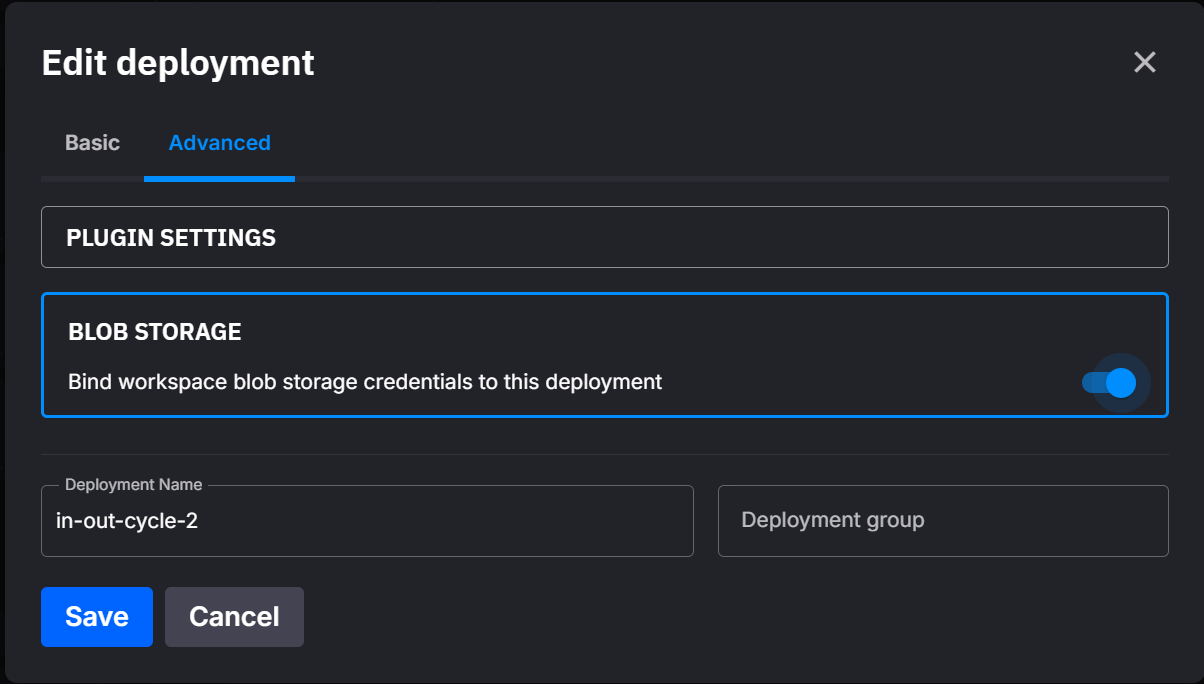
In the deployment dialog, open the Advanced tab and expand the Blob Storage panel. Turn the bind toggle on.
In YAML, set the bind on the deployment in quix.yaml:
The YAML is the source of truth. A sync of YAML whose deployment has no blobStorage block removes the bind. This rule does not apply to a managed service.
A connection must exist first
The toggle binds the connection already configured for your environment. If none exists, the deployment has nothing to bind to. Create one under Settings → Quix Lake first. See Quix Lake connections and storages.
What you get
With the toggle on, Quix injects the connection as a secret variable, Quix__BlobStorage__Connection__Json. It holds the endpoint plus the credentials and the bucket as a JSON document. If a Lakehouse runs on the bound storage, Quix injects the Lakehouse Catalog and Query endpoints too. See Lakehouse variables. For the full list of platform variables, see Quix variables.
Quix writes the variable at deploy time, so redeploy the service after you switch the toggle on. You can read the variable yourself, but the easiest way to consume it is the quixportal library below.
Lakehouse variables
When a Lakehouse Catalog or Query service runs on the storage that the deployment binds, Quix injects the Lakehouse endpoints too. Your code then reaches the Catalog and Query services without hard-coded URLs.
The bind always goes to the main storage, but a Lakehouse stays on the storage that you deployed it on. So after a main storage move, a deployment gets these variables only from a Lakehouse on the new main storage:
| Variable | Description |
|---|---|
Quix__Lakehouse__Catalog__Url |
The Catalog URL, the preferred name. Quix also injects it as CATALOG_URL, the legacy PyIceberg alias, and as QUIX_LAKE_URL, the QuixLake and QuixLab alias. |
Quix__Lakehouse__Catalog__AuthToken |
Authenticates your code's requests to the Catalog. Pair it with Quix__Lakehouse__Catalog__Url. Quix injects it only under the Quix__ name, as a secret. |
Quix__Lakehouse__Query__Url |
The Query URL. |
Quix__Lakehouse__Query__AuthToken |
Authenticates your code's requests to the Query service. Pair it with Quix__Lakehouse__Query__Url. Injected as a secret. |
The connection document keeps its shape when you add a storage or make another storage the main storage. The bucket name in it changes only when an administrator renames the Quix Lake bucket. Quix then restarts the bound deployments, so they take the new name.
One bucket, several storages
A connection can hold more than one storage. Your code still uses one bucket, the Quix Lake bucket, and each storage is a folder inside it. The Folder an administrator sets on a storage is that folder name. Only the main storage may sit at the root of the bucket, so every other storage has a folder. A new storage never moves the storages that are already there.
The injected document names the Quix Lake bucket. Put the folder first in the key to reach a second storage, on the same endpoint and with the same credential:
fs.ls("<your_bucket>/<workspaceId>/")          # your environment folder in the main storage
fs.ls("<your_bucket>/minio/<workspaceId>/")    # your environment folder in the storage named minio
fs is the filesystem that the quixportal library gives you. Quix injects the environment ID as Quix__Workspace__Id.
Quix takes the storage folder off the key before it calls the storage behind it. So a write to <your_bucket>/minio/reports/day.csv lands at reports/day.csv in the bucket behind minio.
The bind always goes to the main storage of the connection. A deployment credential holds a grant on its own environment folder, so it works inside <workspaceId>/ of each storage. A LIST of the bucket root answers 403 AccessDenied for it, and ListBuckets answers the one Quix Lake bucket. Your access follows the rules in Storage permissions: a deployment reads its own environment's data and anything shared with it.
An administrator can change the folder in your keys
- A rename changes the Folder of a storage, and the old folder fails at once. Quix restarts the deployments bound to that storage.
- A main storage move moves your deployment to the new main storage. Quix restarts it, and it gets a new credential.
<your_bucket>/<workspaceId>/then reaches the new main storage. The storage that steps down takes a folder when it sat at the bucket root.
In both cases the bucket name stays. To reach the old data, update the keys in your code:
One copy cannot cross a storage
A copy whose source and destination sit in different storages is refused. Copy inside one storage, or read and write the object yourself.
The quixportal library
quixportal is a Python library that reads the injected credentials and returns an fsspec filesystem, so your file-access code stays the same whatever the storage is. Add it to your service's requirements.txt, so the build installs it. It needs Python 3.12 or later:
The [s3] part pulls in the S3 driver the library needs. To install locally, run pip install "quixportal[s3]".
Read a file with the convenience helper:
from quixportal import get_filesystem

fs = get_filesystem()          # reads Quix__BlobStorage__Connection__Json from the environment
fs.ls("<your_bucket>/<workspaceId>/")
with fs.open("<your_bucket>/<workspaceId>/file.txt") as f:
    data = f.read()
get_filesystem() is the convenience path. For more control use FilesystemFactory, which builds a filesystem from the environment, a dict, or a JSON string, and can validate the connection on creation:
from quixportal.storage import FilesystemFactory

factory = FilesystemFactory(enable_connection_testing=True)
fs = factory.get_filesystem()                 # from the environment variable
# fs = factory.get_filesystem_from_config(cfg)  # from a dict
# fs = factory.get_filesystem_from_json(json)    # from a JSON string
The connection JSON
The bound deployment receives the connection in Quix__BlobStorage__Connection__Json. Quix serves all storage through the Storage Access Gateway, which presents an S3-compatible API. So the injected document always uses the S3Compatible provider, whatever the storage is behind the gateway. You do not need to handle other shapes:
{
  "Provider": "S3Compatible",
  "S3Compatible": {
    "BucketName": "<your_bucket>",
    "AccessKeyId": "<your_access_key_id>",
    "SecretAccessKey": "<your_secret_access_key>",
    "Region": "<region>",
    "ServiceUrl": "https://<your_storage_gateway_endpoint>"
  }
}
ServiceUrl points at the gateway endpoint, and BucketName is the Quix Lake bucket. Region is the region of the storage, or us-east-1 when the storage has none. Quix injects the keys in this PascalCase form, and quixportal reads them as they are.
Your real bucket credentials never leave Quix. The key in this document reaches your environment's data only, and every storage of the connection answers on this one endpoint. See Storage permissions for who may read what, and How to connect for the API surface.
The library can also target Azure, GCS, and a local directory directly, which is useful for tests or running outside Quix. Those are configs you build yourself with the helpers below, not something the platform injects.
Generating the JSON yourself
For local runs or tests, build a valid connection string without going through the platform:
from quixportal.storage import generate_connection_json

json_str = generate_connection_json(
    provider="S3",
    bucket_name="<your_bucket>",
    access_key_id="<your_access_key_id>",
    secret_access_key="<your_secret_access_key>",
    region="us-west-2",
)
Typed builders are also available — create_s3_config(), create_minio_config(), create_azure_config(), and create_local_config() — paired with config_to_json() and config_to_dict().
Next steps
- Quix Lake connections and storages — connect a bucket and add a storage
- Storage permissions — who can read and change what
- How to connect — the API surface your client may use
- Quix variables — every variable the platform injects
.png)